AudioLogic
Real-time spatial audio virtual sink for PipeWire, with a tray app. A from-scratch spatial audio engine for Linux, built around five distinct algorithms — pull instruments close, push vocals into open space, or wrap ambience around you, live.
What it is
AudioLogic is a spatial audio engine for Linux/PipeWire built around five distinct algorithms, each solving a different problem: manufacturing width from narrow masters, re-placing the diffuse field already in a recording, synthesizing distance and space, or decoding matrixed surround.
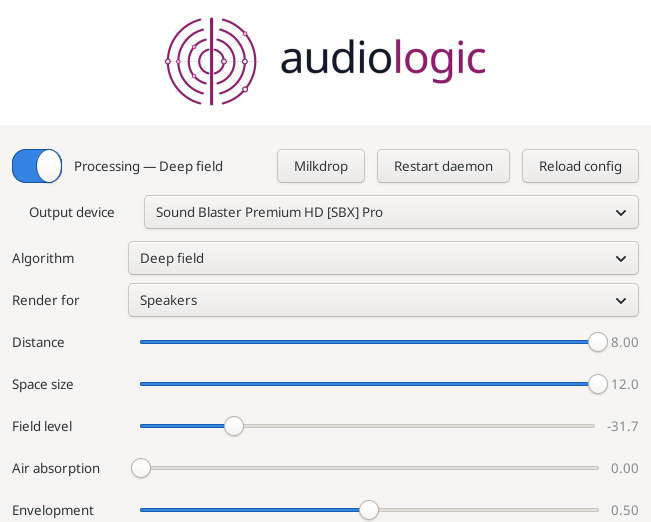
It runs as a persistent virtual sink: every application routes through it automatically. Control lives in a small tray panel — pick the algorithm and output device, then work the parameters directly. On the default deep_field, that means dialing distance, space size, field level and air absorption in real time, with a wet/dry blend that A/Bs against the untouched signal so you can hear exactly what the processing costs.
The design is honest about its trade-offs: bit-exact bypass where it claims one, one-way processing that widens without collapsing your center, and documented limits where the field falls short of its own spec. Whether it improves a given recording depends heavily on the source material and your render profile — speakers and headphones get deliberately different cues — because it recovers and re-places what's there. It doesn't invent detail that was never captured.
Five algorithms, not five presets
These are genuinely different approaches, not variations on one effect. One manufactures width from the signal. One re-places width already in the recording. One synthesizes a space to put the recording inside. Two decode matrixed surround.
| Algorithm | What it does | Adds latency | Works on mono/narrow |
|---|---|---|---|
deep_field (default) |
synthesizes a space and places the source at distance | none | yes |
echo_widener |
manufactures width by adding decorrelated echoes | 21.3 ms (0 when bypassed) | yes |
experimental |
re-places the diffuse field already recorded | 21.3 ms (0 when bypassed) | needs recorded ambience |
matrix_surround |
decodes matrixed surround, passively — mono-safe | none | mono in = mono out |
matrix_steer |
the same, with active crosstalk cancellation | none | mono in = mono out |
Switch live. An unknown name is rejected and the last known-good setting kept.
deep_field — the default. It places a source at a distance and surrounds it with a synthesized field, so a dry, close-mic'd instrument can end up ten metres out in open space. The field is not a reverb: a velvet-noise diffuser makes it dense from the first millisecond, so the space reads as unbounded rather than as a room. Level, air absorption and direct/diffuse balance all fall together with distance, the way they do in the real world.
echo_widener — manufactures width by building decorrelated echoes and steering their energy into the sides rather than the center. It scales with the actual signal level, so it stays audible on compressed, narrow masters where difference-based designs go silent. At a clean center setting, mono content passes through mathematically untouched — no comb on vocals.
experimental — for sitting inside the sound rather than in a room with it. It adds no delay and no reverb: it finds the spatial information already in the master and re-places it. A coherent source passes through bit-exactly. It only moves what is already ambience, so on dry material the change is small — by design, since that is what keeps sources put.
matrix_surround / matrix_steer — these decode rather than invent. They assume the two channels carry a matrixed surround mix (the encoding used by film soundtracks and a great deal of 1990s–2000s music), recover the virtual channels, and fold them back into two. The passive decoder is exactly mono-safe. The active one reaches better than 45 dB of measured separation, against the passive matrix's 3 dB.
Live control
Everything is adjustable while the audio plays. Nothing restarts.
- Tray applet — every live knob as a switch, slider or selector, with the inactive algorithms' rows hidden. Pick the output device from the top of the panel. Middle-click toggles processing for the fastest A/B.
- CLI —
audiologic set <key> <value>,on/off,status,reload. Also processes WAV files offline through the exact same pipeline, so you can A/B a setting without a live stream. - Persistence — every accepted change is saved as it is made, atomically. Restarting the daemon, or having it die, does not cost you the session's tuning.
Render profile matters. Speakers get deliberately gentle cues because acoustic crosstalk does half the work and the sweet spot has to survive. Headphones have no crosstalk and get far stronger ones. The same algorithm on the wrong profile can sound like it does nothing.
The visualizer
A Milkdrop-class visualizer renders what the daemon is actually sending to your speakers. Twenty original presets ship with it — tunnels, vortices, starfields, black holes — each measurably different from every other. When a track changes, its name appears large in the center of the screen, then dissolves into the feedback field and is carried away by the warp.
It reads MPRIS, so it follows whatever is playing: Spotify, a browser tab, VLC, mpv. It cannot affect your audio — structurally, not carefully: it captures the output through its own PipeWire stream, exactly as a recorder would, with no path back into the engine. Vulkan 1.3, verified on Intel integrated graphics and NVIDIA cards alike.
Automatic routing
The daemon creates a real virtual-sink device, so PipeWire makes it the default and auto-routes every application to it. It appears in pavucontrol and the XFCE audio settings like any other output.
Choose where the processed audio finally goes — a specific speaker, a Bluetooth device, or automatic. A chosen device is honored whenever it is present; when it disappears — headphones sleeping, a speaker walking out of range — the engine falls back to the best available rather than to silence, and returns to your choice when it comes back.
Quick start
Install from the DNF repository — register it once, then pull the package:
sudo dnf config-manager addrepo \
  --from-repofile=https://mattmierzwinski.com/fedora/mattmierzwinski.repo
sudo dnf install audiologic
systemctl --user enable --now audiologicd && audiologic on
Updates then arrive through dnf upgrade like any other package.
After a first install, turn processing on once. From then on it comes back the way you left it.
Requirements
- Linux with PipeWire
- GTK3 for the tray applet
- Vulkan 1.3 for the visualizer (optional; Intel integrated graphics or NVIDIA)