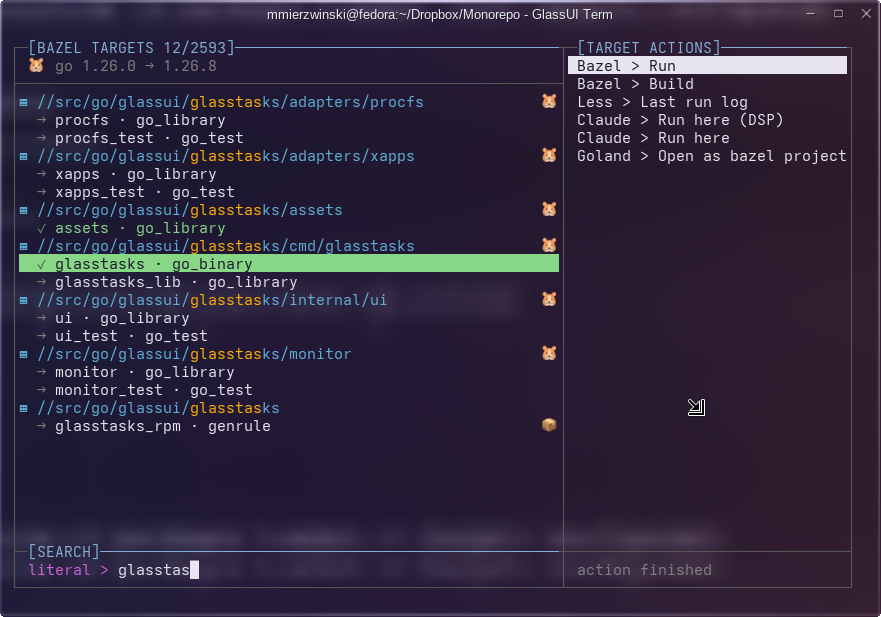
basalt makes a large Bazel monorepo navigable from the terminal. Typing basalt opens a three-panel view: the targets on the left, the actions available for the selected target on the right, and a search field below. Every keystroke refilters; Ctrl+R switches between literal and regular-expression search.
A tree, not a list
Each Bazel package heads a group in its own colour, with that package's targets indented beneath it. Filtering keeps the shape, so it is obvious where in the monorepo the matches live.
Actions that fit the target
- A binary offers Bazel > Run, a test offers Bazel > Test, every rule offers Bazel > Build.
- The Markdown files in the target's directory each become a Nano action.
- Claude Code can be started in the target's directory, with or without the permission bypass.
- GoLand and CLion appear for Go and C/C++ targets when those IDEs are installed, and are simply absent when they are not.
Choosing an action hands the terminal to it and takes it back when it exits, so one basalt session covers a whole build-edit-test loop. After a bazel command basalt reports the outcome and waits for Enter, so the output can be read before the interface paints over it.
The outcome is remembered: a target that passed is drawn green, one that failed red, and its output is kept so Less > Last run log can show it again later.
Requirements
Fedora x86_64 (a pure-static binary with no library dependencies), bazel on $PATH, and $MONOREPO set to the absolute path of the checkout. The target index is built by bazel query and cached as readable JSON under $MONOREPO/basalt_target_cache.