Glass Task Manager

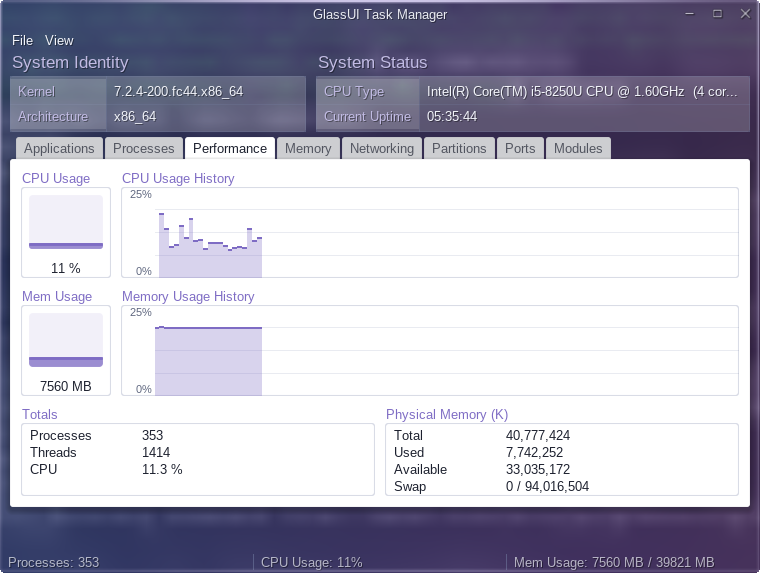
Open windows, every process and live CPU/memory charts — a GlassUI task manager.

Glass Task Manager (glasstasks) is a task manager built with GlassUI, my own OpenGL desktop toolkit. Every control it needed and did not find — tab views, tables, charts, meters, group boxes, a status bar — was built into the toolkit rather than hand-painted here.

A header shows what the machine is — kernel, architecture, CPU — beside what it is doing, its uptime.

Eight tabs

  • Applications — one row per open window, read from the window manager.
  • Processes — every process on the machine, the same set ps reports, read straight from /proc with no process spawned per refresh.
  • Performance — CPU and memory, instantaneous and over time.
  • Memory — the kernel's own memory accounting (used, cached, buffers, slab, mapped, shmem, page tables, dirty, free) drawn as comparable bars.
  • Networking — each interface, grouped up or down, with its address, MAC and traffic counters — what ifconfig shows.
  • Partitions — every real filesystem with its capacity and the disk model behind it — what df shows, minus the pseudo-filesystems.
  • Ports — every TCP and UDP socket with its state and the process holding it — what netstat -anp shows.
  • Modules — loaded kernel modules drawn as a dependency tree — what lsmod shows.

Process actions

A process can be paused, resumed, terminated (SIGTERM) or killed (SIGKILL). Terminate and kill are separate choices, so a program is never killed when you only meant to ask it to close. It runs as you, so it can signal only your own processes.

Requirements

Fedora x86_64 with OpenGL, on Wayland or X11 — chosen automatically. On Wayland the glass comes from the compositor's blur where it offers one, and otherwise frosts your wallpaper. The Applications tab lists X11 windows — on Wayland, the ones running through XWayland. The package installs a desktop launcher; nothing is enabled automatically.

Install on Fedora

Add my package repository once (Fedora 41+ / dnf5):

sudo dnf config-manager addrepo --from-repofile=https://mattmierzwinski.com/fedora/mattmierzwinski.repo

Then install (and later update) the package like any other:

sudo dnf install glasstasks

On older Fedora with dnf4: sudo dnf config-manager --add-repo https://mattmierzwinski.com/fedora/mattmierzwinski.repo

Or download the RPM manually

Dependency tree

glasstasks pulls following dependencies:

  • libEGL.so.1 (64bit)
  • libGL.so.1 (64bit)
  • libX11.so.6 (64bit)
  • libXcomposite.so.1 (64bit)
  • libXext.so.6 (64bit)
  • libXrandr.so.2 (64bit)
  • libXtst.so.6 (64bit)
  • libc.so.6 (64bit)
    • GLIBC_2.14 (64bit)
    • GLIBC_2.2.5 (64bit)
    • GLIBC_2.3.2 (64bit)
    • GLIBC_2.32 (64bit)
    • GLIBC_2.34 (64bit)
    • GLIBC_2.4 (64bit)
    • GLIBC_2.9 (64bit)
  • libfontconfig.so.1 (64bit)
  • libfreetype.so.6 (64bit)
  • libm.so.6 (64bit)
    • GLIBC_2.2.5 (64bit)
  • libresolv.so.2 (64bit)
  • libwayland-client.so.0 (64bit)
  • libwayland-cursor.so.0 (64bit)
  • libwayland-egl.so.1 (64bit)
  • libxkbcommon.so.0 (64bit)
    • V_0.5.0 (64bit)
  • rtld
    • GNU_HASH

Read straight from the package's RPM headers. A library required at several symbol versions is listed once, with those versions nested beneath it. Dependencies this repository provides are expanded; the rest are satisfied by Fedora itself and shown as leaves, because resolving those would mean mirroring Fedora's own repositories.

Changelog

[0.2.0] — 2026-09-29

Added

  • Runs natively on Wayland, chosen automatically: Wayland when the session names a compositor, X11 otherwise. Force either with -backend x11|wayland or GLASSUI_BACKEND. Nothing changes on X11.
  • Glass on Wayland. Where the compositor offers blur (ext-background-effect) the window is translucent and the compositor blurs what is behind it; otherwise the glass frosts your wallpaper — found in sway's or weston's config, or named with GLASSUI_WALLPAPER (PNG or JPEG); otherwise a plain shade. GLASSUI_WAYLAND_GLASS=auto|wallpaper|clear|flat chooses.

Changed

  • On Wayland, dragging, resizing and maximising are the compositor's, as Wayland requires: the titlebar and borders hand the gesture over.

Security

  • Never connects to a compositor the session did not name, and a wallpaper is size-checked before it is decoded.

Known limits

  • On Wayland the Applications tab lists only windows running through XWayland.

[0.1.0] — 2026-09-28

Added

  • First packaged release. A GlassUI task manager with eight tabs: Applications, Processes, Performance (CPU/memory with history charts), Memory, Networking, Partitions, Ports and Modules, under a header showing the machine's kernel, architecture, CPU and uptime.
  • Process actions — pause, resume, terminate (SIGTERM) or kill (SIGKILL). Terminate and kill are separate choices, so nothing escalates silently.
  • Desktop launcher and icon. Nothing is enabled automatically.

Built with technologies I love

This blog runs on open, proven tools — chosen for reliability, not popularity.