GlassTerm
A terminal emulator on a pane of glass — xterm-256color, colour emoji, built on GlassUI.
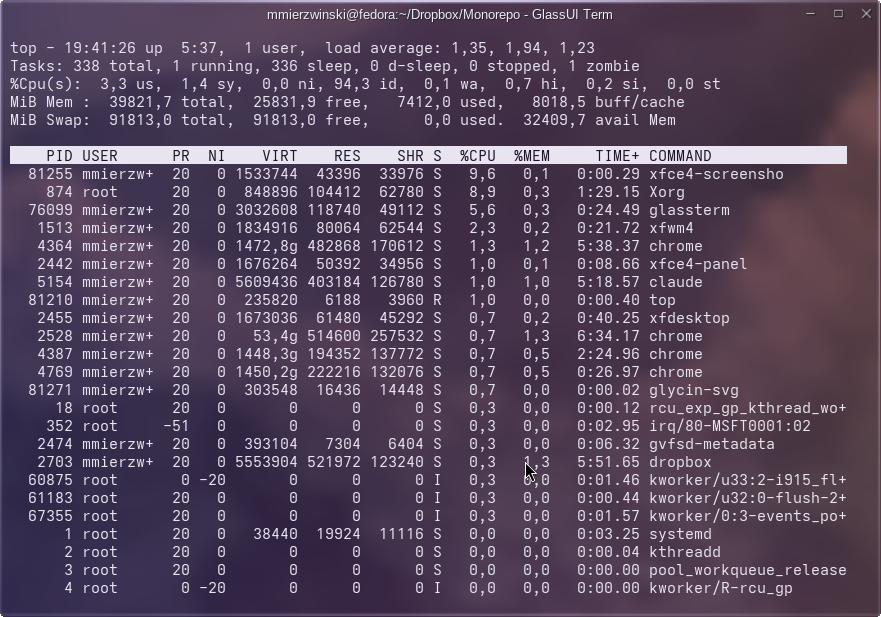
GlassTerm is a terminal emulator built with GlassUI, my own OpenGL desktop toolkit: a translucent glass plate over the composited desktop, a titlebar, and your shell.
It is a real pseudo-terminal, so programs cannot tell it from any other terminal — isatty answers yes, Ctrl-C arrives as SIGINT from the kernel's line discipline, and resizing the window raises SIGWINCH.
What it does
- The xterm-256color subset programs actually use: cursor addressing, scroll regions, insert/delete of lines and characters, the alternate screen, 16/256/24-bit colour, DEC line drawing, bracketed paste and application cursor keys.
vim, less, htop and anything ncurses-based run in it.
- Per-character font fallback, including colour emoji.
- Mouse-wheel scrollback with a draggable scrollbar, and history search on Ctrl-Shift-F.
- Ctrl-Shift-C / Ctrl-Shift-V copy and paste; every other key — Ctrl-C included — goes to the program inside.
Security
A terminal renders whatever a program — or a remote server — sends it, so the hostile-stream cases are tested adversarially: the window title is never reported back to the shell, no reply carries an executable newline, pasted text cannot end bracketed paste or smuggle escape sequences, copied text carries no control characters, and scrollback and escape parameters are bounded.
Requirements
Fedora x86_64 with OpenGL, on Wayland or X11 — chosen automatically. On Wayland the glass comes from the compositor's blur where it offers one, and otherwise frosts your wallpaper. The package installs a desktop launcher; nothing is enabled automatically.
Install on Fedora
Add my package repository once (Fedora 41+ / dnf5):
sudo dnf config-manager addrepo --from-repofile=https://mattmierzwinski.com/fedora/mattmierzwinski.repo
Then install (and later update) the package like any other:
sudo dnf install glassterm
On older Fedora with dnf4:
sudo dnf config-manager --add-repo https://mattmierzwinski.com/fedora/mattmierzwinski.repo
Or download the RPM manually
Dependency tree
glassterm pulls following dependencies:
-
libEGL.so.1
(64bit)
-
libGL.so.1
(64bit)
-
libX11.so.6
(64bit)
-
libXcomposite.so.1
(64bit)
-
libXext.so.6
(64bit)
-
libXrandr.so.2
(64bit)
-
libXtst.so.6
(64bit)
-
libc.so.6
(64bit)
-
GLIBC_2.14
(64bit)
-
GLIBC_2.2.5
(64bit)
-
GLIBC_2.3.2
(64bit)
-
GLIBC_2.32
(64bit)
-
GLIBC_2.34
(64bit)
-
GLIBC_2.4
(64bit)
-
GLIBC_2.9
(64bit)
-
libfontconfig.so.1
(64bit)
-
libfreetype.so.6
(64bit)
-
libm.so.6
(64bit)
-
libresolv.so.2
(64bit)
-
libwayland-client.so.0
(64bit)
-
libwayland-cursor.so.0
(64bit)
-
libwayland-egl.so.1
(64bit)
-
libxkbcommon.so.0
(64bit)
-
rtld
Read straight from the package's RPM headers.
A library required at several symbol versions is listed once, with those
versions nested beneath it. Dependencies this repository provides are
expanded; the rest are satisfied by Fedora itself and shown as leaves,
because resolving those would mean mirroring Fedora's own repositories.
Changelog
[0.2.0] — 2026-09-29
Added
- Runs natively on Wayland, chosen automatically: Wayland when the session
names a compositor, X11 otherwise. Force either with
-backend x11|wayland
or GLASSUI_BACKEND. Nothing changes on X11.
- Glass on Wayland. Where the compositor offers blur (
ext-background-effect)
the window is translucent and the compositor blurs what is behind it;
otherwise the glass frosts your wallpaper — found in sway's or weston's
config, or named with GLASSUI_WALLPAPER (PNG or JPEG); otherwise a plain
shade. GLASSUI_WAYLAND_GLASS=auto|wallpaper|clear|flat chooses.
Changed
- On Wayland, dragging, resizing and maximising are the compositor's, as
Wayland requires: the titlebar and borders hand the gesture over.
Security
- Never connects to a compositor the session did not name, and a wallpaper is
size-checked before it is decoded. A paste from a stalled or endless
clipboard owner is cut off after one second or 16 MB.
[0.1.0] — 2026-09-28
Added
- First packaged release. A GlassUI terminal emulator on a real
pseudo-terminal, implementing the xterm-256color subset: scroll regions, the
alternate screen, 16/256/24-bit colour, DEC line drawing, bracketed paste,
mouse-wheel history and a draggable scrollbar.
- Per-rune font fallback, including colour emoji; history search on
Ctrl-Shift-F.
- Desktop launcher and icon. Nothing is enabled automatically.
Security
- The window title is never reported back to the shell and no reply carries an
executable newline; pasted text cannot end bracketed paste or smuggle escape
sequences; copied text carries no control characters; scrollback and
escape-sequence parameters are bounded. Covered by a CVE regression suite
modelled on the xterm/VTE/iTerm2 disclosure classes.