Lazurite
A console IDE for Go with a classic text-mode desktop — completion, clean-up, build, run and a built-in debugger on function keys.
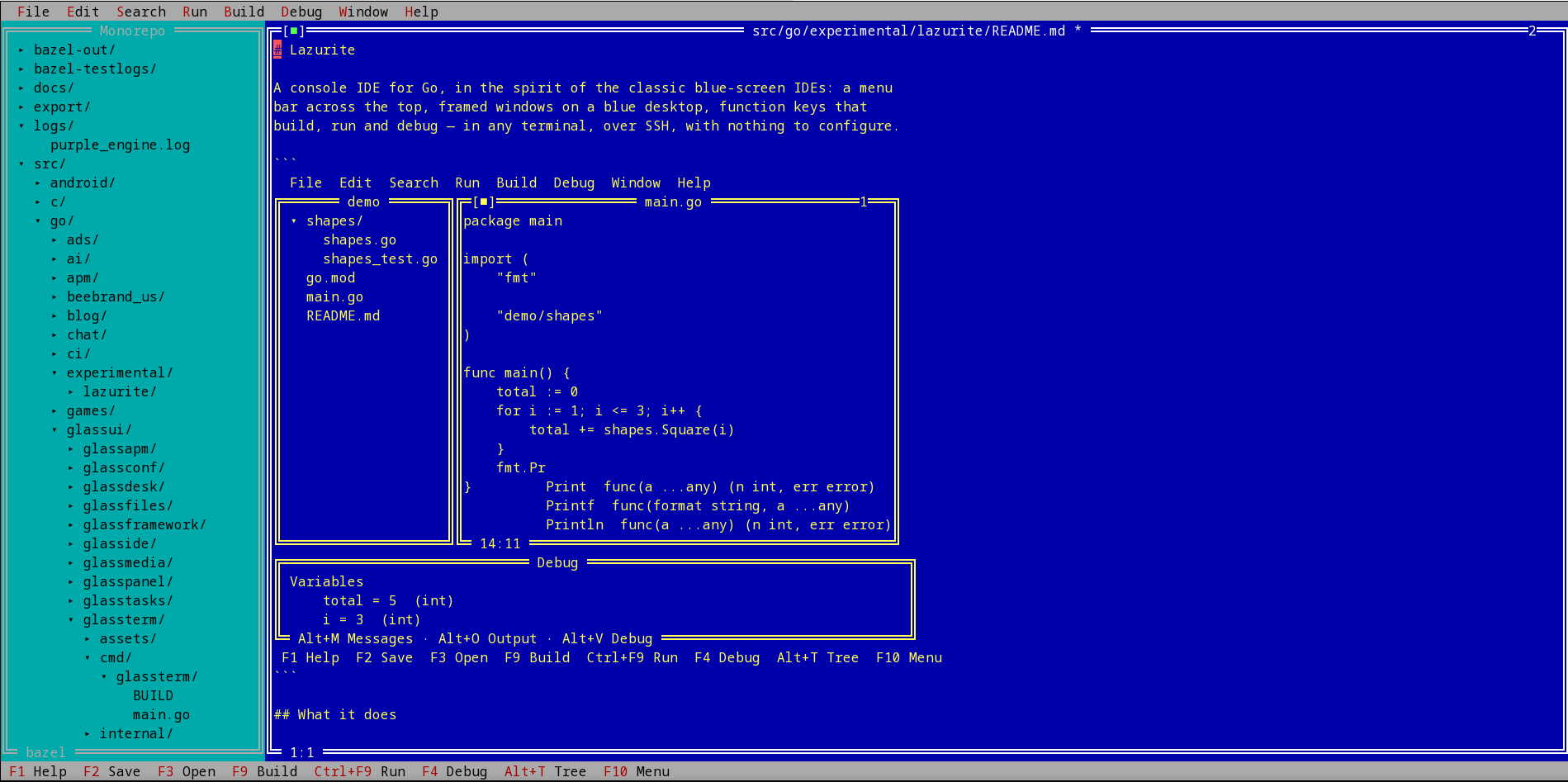
Lazurite is a console IDE for Go in the spirit of the classic blue-screen IDEs: a menu bar across the top, framed windows on a blue desktop, and function keys that build, run and debug — in any terminal, over SSH, with nothing to configure. One static binary.
Write
- Many files at once, across every package and directory of a module, with the project as a tree at the left (Alt+T), a directory browser (F3) and open-in-project (Ctrl+P).
- Completion as you type — names, fields, methods, packages you have not imported yet, in a file you have not saved yet — and what is wrong shown while you write, through
gopls.
- Clean-up on every save: the file is formatted, the imports it uses are added and the ones it does not are removed. Built in; nothing to install.
- Go to definition (F12) in other packages, the standard library and your dependencies.
Build, run, debug
- F9 builds, Shift+F9 runs the tests of the package you are in. A compiler error or a failing test is a line you can press Enter on.
- Ctrl+F9 runs your program on the real terminal — it has the keyboard and the screen — and you come back when it ends.
- A built-in debugger: breakpoints (Ctrl+F8), step over, into and out (F8, F7, Shift+F8), variables you can open, watches and expression evaluation. There is no
dlv to install.
In a monorepo
- Inside a Bazel workspace the same keys use Bazel, and Ctrl+E finds a target by typing — a name or a pattern — then runs, tests or builds it.
- A module that the
go.work above it does not list is refused by the whole Go toolchain, and an editor in it has no completion. Lazurite sees that and runs its tools standalone, so everything works; File → Add project to go.work lists it properly.
- File → New Go project makes the directory,
go.mod, main.go, README.md and .gitignore — and inside a workspace, a BUILD file.
Safe to point at code you did not write
Nothing a file, a compiler, the language server or a debugged program says is passed to your terminal raw, and the invisible characters that can make source read differently from what the compiler sees are shown. Opening a file or a project runs nothing: there are no modelines and no project settings that execute.
Requirements
Fedora x86_64 (a pure-static binary with no library dependencies) and the Go toolchain on $PATH. gopls is optional — without it Lazurite still formats, imports, builds, tests, runs and debugs.
Install on Fedora
Add my package repository once (Fedora 41+ / dnf5):
sudo dnf config-manager addrepo --from-repofile=https://mattmierzwinski.com/fedora/mattmierzwinski.repo
Then install (and later update) the package like any other:
sudo dnf install lazurite
On older Fedora with dnf4:
sudo dnf config-manager --add-repo https://mattmierzwinski.com/fedora/mattmierzwinski.repo
Or download the RPM manually
Other builds
Portable builds for distributions without my DNF repository. These are not
managed by the package manager -- update them by downloading again.
Dependency tree
lazurite pulls following dependencies:
Read straight from the package's RPM headers.
A library required at several symbol versions is listed once, with those
versions nested beneath it. Dependencies this repository provides are
expanded; the rest are satisfied by Fedora itself and shown as leaves,
because resolving those would mean mirroring Fedora's own repositories.
Changelog
[0.1.0] — 2026-10-02
First release.
Added
- A console IDE for Go with a classic text-mode desktop: menu bar, framed
windows, dialogs, function keys. One static binary, no configuration file.
- Editing of many files across every package and directory of a module, with
a project tree (
Alt+T), a directory browser (F3), open-in-project
(Ctrl+P), undo/redo, selection, find and replace, syntax colouring and
the mouse.
- Completion as you type, live problems, go to definition (
F12) and symbol
description (Ctrl+D) through gopls, when it is installed. Completion
works in a file that has not been saved yet.
- Clean-up on every save and on
Ctrl+K: the file is formatted and its
imports are added and removed to match what it uses. Built in — no tool to
install.
- Build (
F9, Alt+F9), test (Shift+F9) and run (Ctrl+F9) on keys.
Errors and failing tests are lines you can press Enter on.
- A built-in debugger: breakpoints, step over / into / out, variables,
watches and expression evaluation. There is no
dlv to install.
- File → New Go project, which makes the directory,
go.mod, main.go,
README.md and .gitignore, and File → Open project.
- Monorepo handling: inside a Bazel workspace the build, test and run keys use
Bazel, and
Ctrl+E finds a target by typing. A module that the go.work
above it does not list is built standalone so that completion and builds
work, and File → Add project to go.work lists it.
- Two ways to get it: an RPM for Fedora, and a portable tarball for every
other Linux — the same static binary, with an
install.sh that puts it
under ~/.local (or /usr/local as root).
Security
- Nothing a file, a file name, a compiler, the language server or a debugged
program says is passed to the terminal raw: control characters are never
drawn, so none of them can retitle the window, read the clipboard or
repaint the screen.
- Invisible characters that can make source code read differently from what
the compiler sees (bidirectional overrides, zero-width characters) are
shown as
¿.
- Opening a file or a project runs nothing: there are no modelines and no
project settings that execute. Programs are started only by
gopls loading
the project, by saving a Go file (which asks the Go tool where imports
live), and by the build, test, run and debug keys.
- Every command is run with its arguments as arguments, never through a
shell, so a file, target or module name cannot be run as a command.
- The debugger and the language server are in this process or on a pipe;
nothing listens on the network.
What you need
- Linux, and the Go toolchain on
PATH.
- Optional:
gopls on PATH for completion and live problems
(go install golang.org/x/tools/gopls@latest).