AudioLogic
Spatial Audio Engine for Linux/PipeWire built around five distinct algorithms.
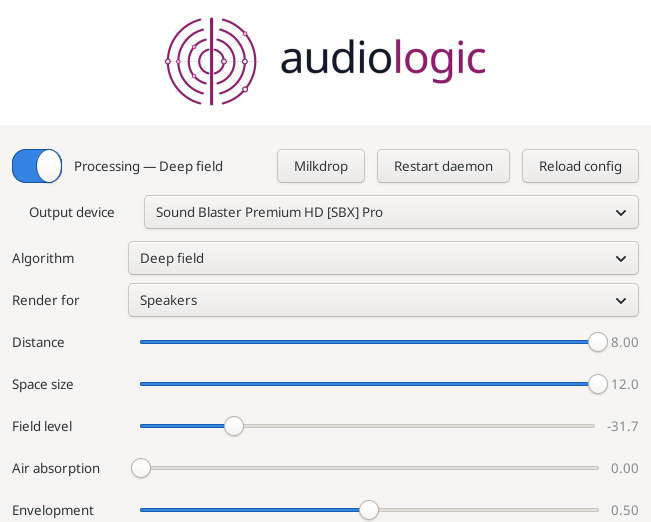
AudioLogic is a spatial audio engine for Linux/PipeWire built around five distinct algorithms, each solving a different problem: manufacturing width from narrow masters, re-placing the diffuse field already in a recording, synthesizing distance and space, or decoding matrixed surround. It runs as a persistent virtual sink — every application routes through it automatically — and control lives in a small tray panel: pick the algorithm and output device, then work the parameters directly. On the default deep_field, that means dialing distance, space size, field level and air absorption in real time, with a wet/dry blend that A/Bs against the untouched signal so you can hear exactly what the processing costs.
The design is honest about its trade-offs: bit-exact bypass where it claims one, one-way processing that widens without collapsing your center, and documented limits where the field falls short of its own spec. Whether it improves a given recording depends heavily on the source material and your render profile — speakers and headphones get deliberately different cues — because it recovers and re-places what's there, it doesn't invent detail that was never captured.
Install on Fedora
Add my package repository once (Fedora 41+ / dnf5):
sudo dnf config-manager addrepo --from-repofile=https://mattmierzwinski.com/fedora/mattmierzwinski.repo
Then install (and later update) the package like any other:
sudo dnf install audiologic
On older Fedora with dnf4:
sudo dnf config-manager --add-repo https://mattmierzwinski.com/fedora/mattmierzwinski.repo
Or download the RPM manually
Other builds
Portable builds for distributions without my DNF repository. These are not
managed by the package manager -- update them by downloading again.
Dependency tree
audiologic pulls following dependencies:
-
/usr/bin/bash
-
SDL2
-
gtk3
-
libSDL2-2.0.so.0
(64bit)
-
libatk-1.0.so.0
(64bit)
-
libc.so.6
(64bit)
-
GLIBC_2.14
(64bit)
-
GLIBC_2.2.5
(64bit)
-
GLIBC_2.32
(64bit)
-
GLIBC_2.34
(64bit)
-
GLIBC_2.38
(64bit)
-
GLIBC_2.4
(64bit)
-
libcairo-gobject.so.2
(64bit)
-
libcairo.so.2
(64bit)
-
libgcc_s.so.1
(64bit)
-
libgdk-3.so.0
(64bit)
-
libgdk_pixbuf-2.0.so.0
(64bit)
-
libgio-2.0.so.0
(64bit)
-
libglib-2.0.so.0
(64bit)
-
libgobject-2.0.so.0
(64bit)
-
libgtk-3.so.0
(64bit)
-
libharfbuzz.so.0
(64bit)
-
libm.so.6
(64bit)
-
GLIBC_2.2.5
(64bit)
-
GLIBC_2.27
(64bit)
-
GLIBC_2.29
(64bit)
-
libpango-1.0.so.0
(64bit)
-
libpangocairo-1.0.so.0
(64bit)
-
libpipewire-0.3.so.0
(64bit)
-
libstdc++.so.6
(64bit)
-
CXXABI_1.3
(64bit)
-
CXXABI_1.3.5
(64bit)
-
CXXABI_1.3.9
(64bit)
-
GLIBCXX_3.4
(64bit)
-
GLIBCXX_3.4.11
(64bit)
-
GLIBCXX_3.4.14
(64bit)
-
GLIBCXX_3.4.18
(64bit)
-
GLIBCXX_3.4.19
(64bit)
-
GLIBCXX_3.4.20
(64bit)
-
GLIBCXX_3.4.21
(64bit)
-
GLIBCXX_3.4.22
(64bit)
-
GLIBCXX_3.4.26
(64bit)
-
GLIBCXX_3.4.29
(64bit)
-
GLIBCXX_3.4.31
(64bit)
-
GLIBCXX_3.4.9
(64bit)
-
libvulkan.so.1
(64bit)
-
libz.so.1
(64bit)
-
pipewire
-
rtld
-
vulkan-loader
-
wireplumber
Read straight from the package's RPM headers.
A library required at several symbol versions is listed once, with those
versions nested beneath it. Dependencies this repository provides are
expanded; the rest are satisfied by Fedora itself and shown as leaves,
because resolving those would mean mirroring Fedora's own repositories.
Changelog
[2.4.3] — 2026-08-19
Fixed
-
The RPM could not be installed on another machine. dnf refused it with
nothing provides libm.so.6(GLIBC_2.43). The package was correct — that
requirement is generated from the binary — but the requirement itself was too
new: glibc 2.43 (Fedora 44) introduced fresh symbol versions for three
single-precision maths functions (sqrtf, atan2f, log10f), and building
here recorded a dependency no older distribution can satisfy.
The two DSP binaries now route those calls through the double-precision entry
points, which are still versioned at glibc 2.2.5, and compile with
-fno-math-errno so sqrt becomes a hardware instruction instead of a libm
call at all. The floor drops from glibc 2.43 to 2.38 (Fedora 39 and newer),
and the numbers are unchanged.
Adding Requires: glibc >= 2.43 would not have fixed this — it only renames the
failure on a machine whose repositories have no such glibc.
[2.4.2] — 2026-08-19
Fixed
-
The daemon no longer dies between songs. Every two or three track changes
the audio stopped, because audiologicd was being killed outright — not
crashing — and systemd was restarting it three seconds later. PipeWire runs the
audio callback on a real-time thread and, from inside our own process, lowers
RLIMIT_RTTIME to 200 ms; the kernel kills a real-time thread that computes for
that long without waiting, and because the soft and hard limits are equal there
is not even a warning signal first. A track boundary suspends and resumes the
graph, the graph then runs cycles back to back to catch up, and at roughly 7 ms
of DSP per cycle it takes only a few dozen of them to reach the limit.
The audio thread now measures itself: after 60 ms of computing with no wait in
between, it passes audio straight through until the graph has caught up, fading
across the seam rather than stepping. The effect gives way for a block or two;
the daemon does not die. Measured on the failure as reported — Bluetooth
output, deep_field, skipping tracks every 14 seconds — twenty consecutive
track changes with zero restarts, where the same test previously killed the
daemon twice in seven. The six bursts that did occur cost one 42 ms block each.
The daemon reports them (real-time relief engaged (N bursts, M blocks …)), so
a machine that has to shed work constantly is visible rather than silent.
Note
- The unit's
LimitRTTIME=infinity never had the effect its comment claimed: the
limit is lowered by PipeWire after systemd sets it, from inside the process,
and a hard limit cannot be raised back without privileges the daemon does not
have. The comment now says so.
[2.4.1] — 2026-08-19
Added
- Switch output device from the tray icon: right click → Output device,
with Automatic and every device the daemon can see. Changing output is the
thing this applet is asked for most often and it does not deserve a window.
It is also unusually painless here, and the reason is structural rather than
clever: every application is connected to one virtual sink, so the change
happens downstream of them — nothing an application holds has to move, and
none of them notice. The usual "most things moved, but one app is still on the
old speakers" cannot happen.
[2.4.0] — 2026-08-19
Added
- Bluetooth output works, and any other kind of sink. The routing used to
select its target by matching node names against
alsa_output, so a Bluetooth
speaker was invisible to it however highly PipeWire ranked it — on the machine
this was found on, the connected speaker outranked the built-in card and was
still never chosen.
- An output-device selector in the tray panel, and
output_device on the
control surface (audiologic devices, audiologic set output_device …).
Automatic — the highest-priority sink — remains the default. A chosen device is
honoured whenever it is present, and when it disappears the daemon falls back to
the best available rather than to silence, returning to the choice when it
returns.
Changed
- Routing moved into the daemon.
route-daemon.sh, unroute-daemon.sh,
move-streams.sh and the suspend watcher are gone, along with the
audiologic-resume.service unit and the package's python3 and
pipewire-utils dependencies. The daemon holds the PipeWire connection that
owns the nodes, so it links them itself and reacts to registry events: a device
appearing, disappearing or re-enumerating after suspend is now an event rather
than a retry loop or a second service watching logind.
- The router also removes bypass links — a player left feeding the hardware
directly, which happens whenever the daemon was briefly not running, and which
sounds exactly like the DSP doing nothing.
[2.3.1] — 2026-08-19
Changed
- The tray panel's masthead. The logotype now spans the top of the panel as a
white full-width bar with the logo centred in it, flush to the top edge. The
artwork is a horizontal lockup — the mark beside the wordmark, trimmed of the
whitespace the stacked version carries — because the stacked logotype is nearly
square: at any width that keeps it legible it eats a third of a control panel,
and at a height that does not, it is unreadably small.
[2.3.0] — 2026-08-19
Fixed
- The daemon was killed on every track change while the visualizer was
running, taking the visualizer down with it (
BindsTo) and interrupting
playback for about three seconds. The visualizer's capture stream asked
PipeWire for RT_PROCESS, which put its callback inside the same real-time
graph cycle as the DSP. PipeWire runs that cycle on an rtkit-elevated SCHED_RR
thread with a 200 ms RLIMIT_RTTIME, and the kernel SIGKILLs a real-time
thread that overruns it — so a graph re-negotiation, which is exactly what a
track change causes, killed audiologicd outright (status=9/KILL).
The visualizer now captures on an ordinary thread, as its own design always
said it should; a missed buffer costs a slightly older frame and nothing else.
A compile-time assertion keeps the flag from coming back, the capture asks for
the same 2048-frame quantum the daemon pins, and the daemon's unit sets
LimitRTTIME=infinity as a backstop.
Added
- Branding. The logotype now appears at the top of the tray panel (compiled
into the binary, so it cannot go missing), the tray menu has an About
AudioLogic entry and the panel a footer link, both opening the project page.
The CLI and the visualizer print the project and its page on
--help. The
visualizer opens with a card carrying the logotype's mark — concentric arcs
split by a centre bar, in the brand magenta — drawn as ordinary line geometry
so whichever preset is running tears it apart, like any other title. The tray
icons are redrawn as that same mark, magenta when processing and navy when in
pass-through. Written by Matt Mierzwinski;
https://mattmierzwinski.com/page/audiologic.
[2.2.0] — 2026-08-19
Added
- The visualizer announces what is playing. On a track change the name
appears large in the centre of the screen, holds for two seconds while it is
legible, and is then handed to the feedback field — where the preset's warp
tears it apart and the decay takes it away, the way Milkdrop did it in Winamp.
The two stages are two different render passes: crisp on the composited frame
first, then geometry inside the field.
- Read over MPRIS, the freedesktop standard, so it works with any
compliant player — Spotify, browsers, VLC, mpv, Rhythmbox — and prefers
whichever player is actually playing when several are on the bus.
- Drawn with a built-in vector stroke font: no font file to ship or find, and
the text is ordinary line geometry, which is exactly why the preset can
destroy it for free.
- A missing player or session bus is not an error, and a player re-emitting its
metadata (on a pause, a seek, a volume nudge) does not put the title back on
screen.
[2.1.0] — 2026-08-19
Changed
- Space now shows the next preset — it is the key everyone presses without
reading anything. Locking moved to L, and Space releases a lock rather
than doing nothing.
Added
- Eighteen more visualizer presets, twenty in total, each built around a
different motion signature rather than a variation of one: vortex,
kaleidoscope, starfield, ripple, smoke, pulse grid, spiral galaxy, liquid, neon
scope, deep space, fracture, breathe, stormfront, inversion, helix — plus
three built on the beat: hyperspace (flight, throttled by bass),
blackhole (the field falls inward hardest near the horizon and the whole
picture flares on each kick) and supernova (still between kicks, then a
charge-and-blast outward with a gamma flash).
- Seven waveform modes for presets to select with
nWaveMode — a ring, an
X-Y oscilloscope of the stereo field, the centred line, two lines one per
channel, an outward spiral, a spectrum arc, and a radial burst with one spoke
per band. Previously every preset drew the same line, which made presets with
quite different equations look alike.
- Additive blending for waveforms (
bAdditiveWaves), which is what keeps a
wave visible against a bright feedback field.
- A corpus test. Every shipped preset must compile with no unsupported
construct, stay finite and on-screen on material from silence to overload, and
be measurably different from every other preset — each is reduced to what it
does to the field and no two may land in the same place. It caught two
near-duplicates while the set was being written.
[2.0.0] — 2026-08-18
Added
- Two matrix surround decoders,
matrix_surround and matrix_steer. These
decode rather than invent: they assume the two channels carry a matrixed
surround mix, recover left, right, centre and the surrounds, and fold them back
into two. The passive one is fixed and exactly mono-safe; the active one adds a
dominance servo and crosstalk cancellation, measuring better than 45 dB of
separation on encoded material against the passive matrix's 3 dB. Both are the
cheapest algorithms in the project — 0.8 % and 2.2 % of a core — and add no
latency. Knobs: surround_gain, plus centre_width, dimension and
panorama for the steered decoder.
audiologic-vis, a Milkdrop-class visualizer. Preset visuals driven by
what you are actually hearing: a feedback renderer (Vulkan, RGBA16F ping-pong
targets) whose motion comes from .milk preset programs — an expression
compiler and register VM run the per-frame and per-vertex equations, with the
audio bound to the variables presets are written against. Alt+Enter or F for
fullscreen, N/P to change preset, Space to lock, Esc to quit. Opened from the
tray application's Milkdrop button, its menu, or
systemctl --user start audiologic-vis.
- It cannot affect playback. A separate process with its own PipeWire
capture stream: no code path into the daemon, no socket, no shared memory.
The systemd pin is one-way (
BindsTo), and it never requests real-time
scheduling.
- Verified on Intel integrated graphics; discrete GPUs are preferred where both
are present, and
AUDIOLOGIC_VIS_GPU overrides the choice.
- Two starter presets are installed on first run. The classic third-party
corpus is not redistributed.
Changed
- The RPM and tarball now carry the visualizer, its user unit and the starter
presets. New runtime requirements:
SDL2 and vulkan-loader (a GPU driver is
a runtime matter — mesa on Intel and AMD, the proprietary package on NVIDIA).
[1.4.3] — 2026-08-18
Fixed
- Settings were never saved. The daemon read its config file at start-up and
never wrote to it, so everything dialled in over a session lived only in that
process's memory: restarting it — or having it die — silently reverted to the
built-in defaults, which is indistinguishable from the controls not working.
Every accepted change is now written back to
~/.config/audiologic/config.json as it is made, atomically (a temporary file
and a rename, so an interrupted write cannot leave a config that will not
load), and the file is created on first use if it does not exist. A change
that cannot be saved is still applied, and the reply says so.
- Whether processing was on is remembered too, so a daemon that restarts
comes back processing rather than silently in pass-through. A daemon that has
never been told anything still starts in pass-through.
- The playback profile ("Render for") was unreachable on Deep field, though
the algorithm has its own speaker and headphone profiles — it was scoped to
the immersive algorithm alone. On headphones the speaker profile is close to
transparent, so this was audible as the algorithm doing less than it should.
recycle had no control at all despite being a live knob; it now has a
slider on the Deep field panel.
Changed
- The shipped defaults are now the deep_field tuning in use:
deep_field on
headphones, distance 8, space size 12 s, field level −26.1 dB, air 0.22,
envelopment 1.0, crispness +6 dB at 6766 Hz. Existing config files are
untouched; this is what a fresh install starts from.
[1.4.2] — 2026-08-18
Added
- A
bass control, in the panel and live (audiologic set bass 0.6). It is
a trim rather than a tone control: 1.0 (the default) is the track's own bass,
passed through bit-exactly — the filter is skipped, not run flat — and 0.3 is
about −10.5 dB below 180 Hz. It applies to every algorithm, and is there for
the low-frequency build-up a large field_size or a close distance produces
in deep_field. Measured on real material at 0.3: −9.7 dB below 180 Hz,
+0.2 dB from 1–6 kHz, and −2.7 dB through the low mids where the shelf's slope
reaches.
Fixed
audiologic --help listed the live keys from a hand-written list that had
fallen six knobs behind, so the deep_field controls were undiscoverable from
the command line. It is generated from the knob table now, like the status
reply.
[1.4.1] — 2026-08-18
Fixed
- The Deep field sliders snapped back a second after being moved. The value
was sent and applied, but the daemon's status reply — which the tray panel
re-reads on a timer — never mentioned the six deep_field knobs, so on the next
read the panel saw nothing for them and put its sliders back to the defaults.
The status reply is now generated from the same table that defines the knobs,
so every knob the daemon accepts is also reported. Requires restarting the
daemon (
systemctl --user restart audiologicd, or Restart daemon in the
panel) — the fix is in the daemon, not the panel.
[1.4.0] — 2026-08-18
Added
- A third algorithm:
deep_field. Distance and a synthesized, boundary-less
space — a source can be placed far away and surrounded, which neither other
algorithm can do (the echo widener has no distance model, and the immersive
algorithm is required by test to leave a dry source exactly where it is). It
adds no discrete echo: a velvet-noise diffuser makes the field dense from its
first millisecond, and an eight-line feedback network with in-loop diffusion
carries the decay. Knobs: distance, field_size, field_level, air,
envelopment, recycle, all live and all in the tray panel.
Cost: about 23% of one core; no added latency.
- The field ducks where a recording already has one.
deep_field measures how
diffuse each frequency band already is and sends only that much into the space,
so a dry instrument gets the full treatment while an already-reverberant mix is
left alone rather than given a second room. recycle sets how much of the
already-diffuse part still goes through; 0, the default, sends none of it.
- Speakers and headphones get their own field tuning, and a mild
behind-the-head colouring is applied to the surrounding field only, never to
the sound itself.
- The tray application replaces a running instance. Starting it a second time
terminates the first rather than adding a second icon and a second poller to
the same daemon. It checks that the recorded process is still alive AND is the
same program before signalling anything, so a recycled process id is never
disturbed.
--allow-multiple opts out. It also shuts down cleanly on SIGTERM
now, so the icon disappears and the record is released.
[1.3.0] — 2026-08-18
Fixed
- The immersive algorithm pulled centred voices toward the left ear. A vocal
could end up sounding as though the singer were standing at your left eye rather
than in front of you. Each of the algorithm's per-frequency adjustments nudges
one narrow slice of the sound to one side, and it is only their alternation
across the spectrum that turns that into width instead of a pan — but the
alternation had become slower than the bandwidth of a voice, so a whole voice was
pushed the same way. Measured at 7.2 dB into the left ear; now within 0.15 dB.
The alternation is faster, and the left/right balance of every frequency band —
both its level and its timing — is now measured and restored, so the effect can
no longer move the image sideways at all. A source that the mix itself panned
stays exactly where the mix put it.
Changed
- "Ambience depth" is now "Distance", and it does what the name says. It
trades the direct sound against the space around it — the ear's primary distance
cue — instead of merely turning the ambience up: above 1.0 sources move back into
the room, below 1.0 they come forward, 1.0 is neutral. Its range is now 0.25–4.0.
If you had it set to 2.0, that now means "a little further away" rather than
"6 dB more ambience"; try higher values for real distance.
- Slightly less width than 1.2.1 on ordinary material (inter-channel coherence
0.50 → 0.40 at the defaults, rather than 0.37). Holding the left/right balance
costs some of it, because the widening works by imbalancing individual
frequencies. Centred and correct beats wide and pulled to one side.
[1.2.1] — 2026-08-18
Fixed
- The immersive algorithm could make already-wide material NARROWER, which is
the opposite of its purpose. On a production that has already spread a vocal out
in space — a Schiller record, say — the vocal was pulled back into the centre of
the head. Two causes, both fixed:
- Its mid/side rotation equalises mid and side rather than widening, and where
a bin's mid and side components are correlated — which is exactly what studio
widening produces — one direction of that rotation cancels the side signal
outright. The rotation is now one-way: it can only ever move energy out of the
centre, never into it, whatever the material.
- The "rear-ness" colouring was net-attenuating and was applied in proportion to
how diffuse a bin was, so it quietened the widest content in the mix in the
presence band, letting the dry centre dominate. It is now normalised to leave
the level alone and only shape the field.
- Measured, at the strongest settings available: a reverberant spread-out vocal now
comes out 43% wider instead of collapsing, already-decorrelated material is no
longer narrowed, and studio-widened material is left exactly as it is rather than
being "corrected".
Changed
- The effect is a little gentler on ordinary material than 1.2.0 (inter-channel
coherence 0.50 → 0.37 on headphones at the defaults, rather than 0.21) — 1.2.0
bought some of its strength by widening in ways that damaged material which was
already wide. Reach for
ambience_depth if you want more.
[1.2.0] — 2026-08-18
Fixed
- The tray application did not work on a comma-decimal locale (Polish, German,
French, most of continental Europe). GTK adopts the system locale on startup, so
the panel wrote settings as
0,42 — which the daemon rejected as "not a number"
— and could not read the daemon's own 0.70 either, stopping after the first
character. The result was a panel whose sliders showed defaults, refused every
change with an error, and made the immersive algorithm look like it did nothing.
Settings are now always written with a dot and accepted with either a dot or
a comma, so a value typed by hand in a comma locale works too.
- Values that are on/off are always shown as a toggle in the panel, never as a
slider that could be dragged to a rejected value. (The one such setting,
Anti-flutter, already was; the check is now structural.)
Added
- The tray application starts the daemon for you. If
audiologicd is not
running when the panel opens, it is started (systemctl --user start — a user
unit, so no password and no privileges). Skip it with --no-start.
- A "Restart daemon" button, in the panel header and in the tray menu. It
stays available while the daemon is down, which is when you need it. Because the
daemon always comes back in pass-through, processing is switched back on
afterwards if it was on before — a restart does not silently change what you
were hearing.
Changed
- The immersive algorithm is considerably stronger, especially on headphones.
Its inter-channel cues had been tuned for speakers and applied to headphones as
well, where there is no acoustic crosstalk to work against; the headphone
profile now gets much wider cues of its own. Measured on ambience-bearing
material, inter-channel coherence at the defaults: 0.50 → 0.21 on headphones
and → 0.31 on speakers (previously 0.25 and 0.40), with the loudness unchanged.
ambience_spread now defaults to 1.0 (was 0.7). It changes placement only, not
level, so there is nothing to trade off by having it at full.- Slightly more of a master's ambience is now recognised as ambience, so there is
more for the algorithm to work with on ordinary mixes. Mono and centred content
still pass through bit-exactly.
Note
Set "Render for" to match what you are listening on. It defaults to speakers,
and on headphones that setting is deliberately gentle enough to sound nearly
transparent — this is the single biggest reason for "I can't hear it".
[1.1.0] — 2026-08-18
Added
- A second spatial algorithm, selectable live.
spatial_algorithm chooses
between echo_widener (the default — unchanged) and experimental. Switch it
without restarting: audiologic set spatial_algorithm experimental.
- Immersive reconstruction (
experimental): deep, enveloping width with
nothing echoed. Per frequency bin it separates the coherent source from the
diffuse field already recorded around it, leaves the source exactly where the
mix put it, and re-places the diffuse part around you using coherence, level and
frequency-dependent phase — no delays, no reverb. Mono and centred content pass
through bit-exactly, so a centred voice never moves.
- New knobs for it, all live-settable and shown in
audiologic status:
render_target (speakers / headphones), ambience_spread (how far the
diffuse field is re-placed; 0 bypasses the stage), ambience_depth (its level;
1.0 is energy-exact), direct_spread (0 keeps instruments in place, above 0
spreads their partials around you too).
audiologic-tray, a desktop application for XFCE. A permanent system-tray
icon: left click opens a control panel with a switch, sliders and mode selectors
for every live knob, middle click toggles processing, right click opens a menu.
Closing or minimising the window returns it to the tray. Desktop notifications
when the daemon appears or disappears, when processing is switched on or off,
when the algorithm changes, or when a setting is refused. Knobs belonging to the
algorithm that is not running are hidden. Requires gtk3.
Start it at login with:
cp /usr/share/audiologic/audiologic-tray-autostart.desktop ~/.config/autostart/
Changed
audiologic status now also reports spatial_algorithm, render_target,
ambience_spread, ambience_depth and direct_spread.audiologic set accepts the five new keys above. Every existing key behaves
exactly as before.
Security
- The configuration parser rejects unknown or wrong-typed values for the two new
string settings (
spatial_algorithm, render_target) instead of silently
falling back to a default, and range-checks the three new numeric ones. As
before, a rejected configuration leaves the running one untouched.
Upgrading
Nothing to do. An existing ~/.config/audiologic/config.json keeps working and
keeps sounding identical: the new settings default to the previous behaviour, and
the default algorithm is byte-for-byte the one you had. To try the new one, set
spatial_algorithm to experimental (or pick "Immersive" in the tray app) — and
spatial_algorithm back to echo_widener to return.
[1.0.0] — 2026-07-10
Added
- First release: a real-time stereo widener for PipeWire, installed as a routable
virtual output device that every application can play into, with per-band
echoes, band-logic steering, STFT direction re-staging, a broadband Haas
widener, a treble shelf, DC blocking and a soft-knee limiter.
audiologicd (the DSP daemon, pass-through until enabled), the audiologic
CLI (status/on/off/reload/set), offline WAV processing, a systemd user
unit and suspend/resume self-healing.
Project homepage